One-Click Swaps
Buying $WUD with DOT used to take two trips: first move your DOT from Asset Hub to Hydration, then buy. Not anymore. One-click swaps are live: pick DOT from Asset Hub, press Buy, approve once, and the $WUD is yours.
Posted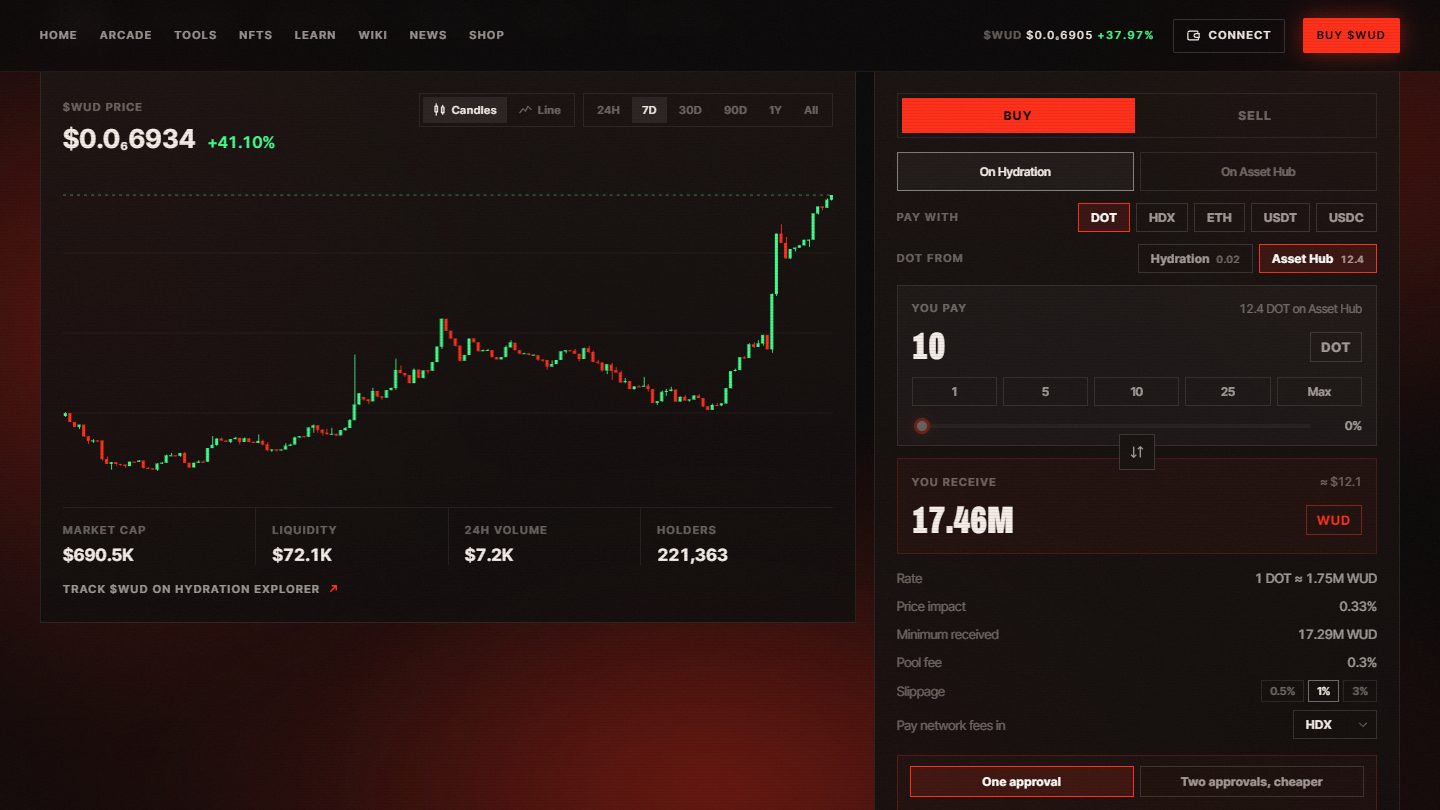 Buy $WUD now
No more cross-chaining first
Most people keep their DOT on Polkadot Asset Hub, while the deepest $WUD pool lives on Hydration. Until now that meant a separate transfer before every buy. Now the Trade page does both in a single step: your DOT crosses to Hydration and is swapped for $WUD the moment it lands.
How it works
- Choose DOT from Asset Hub on the Trade page. Your balance on each chain is shown right next to it.
- Enter an amount, or type how much $WUD you want to receive.
- Approve once. A live progress window follows your DOT across and shows the $WUD arriving in your Hydration account.
Safe by design
Every buy is checked on both chains before you sign, so you know it will go through. If the price moves past your slippage before the swap runs, the swap is skipped and your DOT lands safely in your Hydration account instead, ready to use.
One approval or two
One approval is the quickest way in, for buys of 0.5 DOT or more, and about 0.07 DOT goes to network fees. Want to save on fees? Choose Two approvals and the page moves your DOT first, then buys, for under 0.01 DOT in fees. The choice is yours every time.